
Let customers collect their order from a shop down the road
Cornerdrop adds a pickup-point map to your Shopify store. Your customers choose a nearby pickup point at checkout and collect their parcel when it suits them, instead of staying home for a delivery. The pickup address goes straight onto the order.
Works with carriers like DPD, Evri and UPS. On Shopify Plus it sits in checkout; on other Shopify plans, just after checkout.
Home delivery doesn't suit every customer
Plenty of your customers are out at work when the courier calls. Offering pickup points gives them another way to get their order, without you changing carrier.
Fewer missed deliveries
A parcel waiting at a local shop can't be missed. Customers collect it when it suits them, rather than chasing a redelivery.
No parcels left on the doorstep
Orders are held behind a counter until the customer picks them up, instead of being left outside or with a neighbour.
Uses the carrier you already have
Cornerdrop shows your carrier's own network of pickup points, such as local shops, so you don't need a new courier contract.
Three steps, and we'll do them with you
Install and connect your carrier
Add Cornerdrop from the Shopify App Store and connect the carrier account you already ship with.
Add a pickup-point rate
Create a pickup-point shipping rate in Shopify, such as "Pickup Points". You decide the price, and it can be free.
Customers choose a point
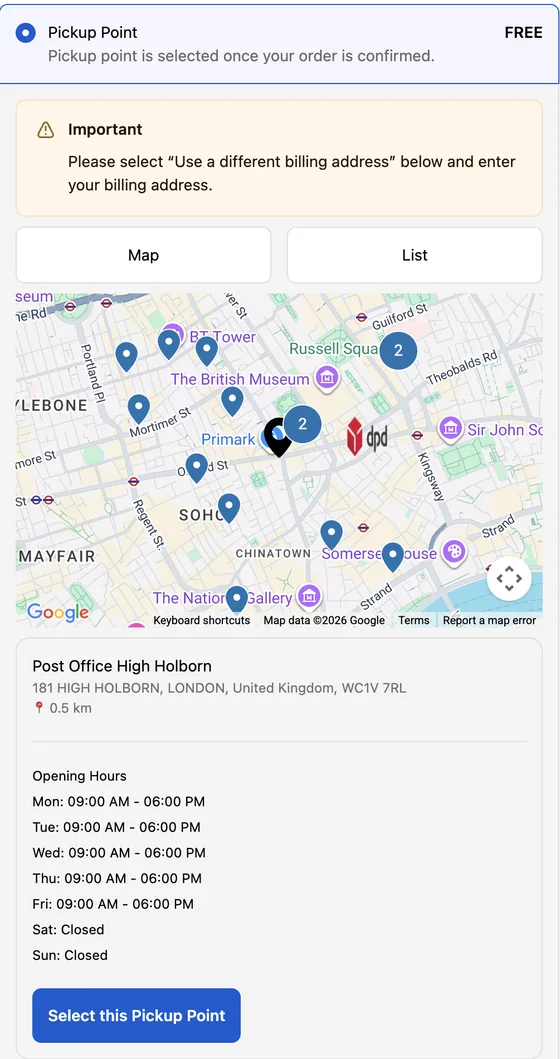
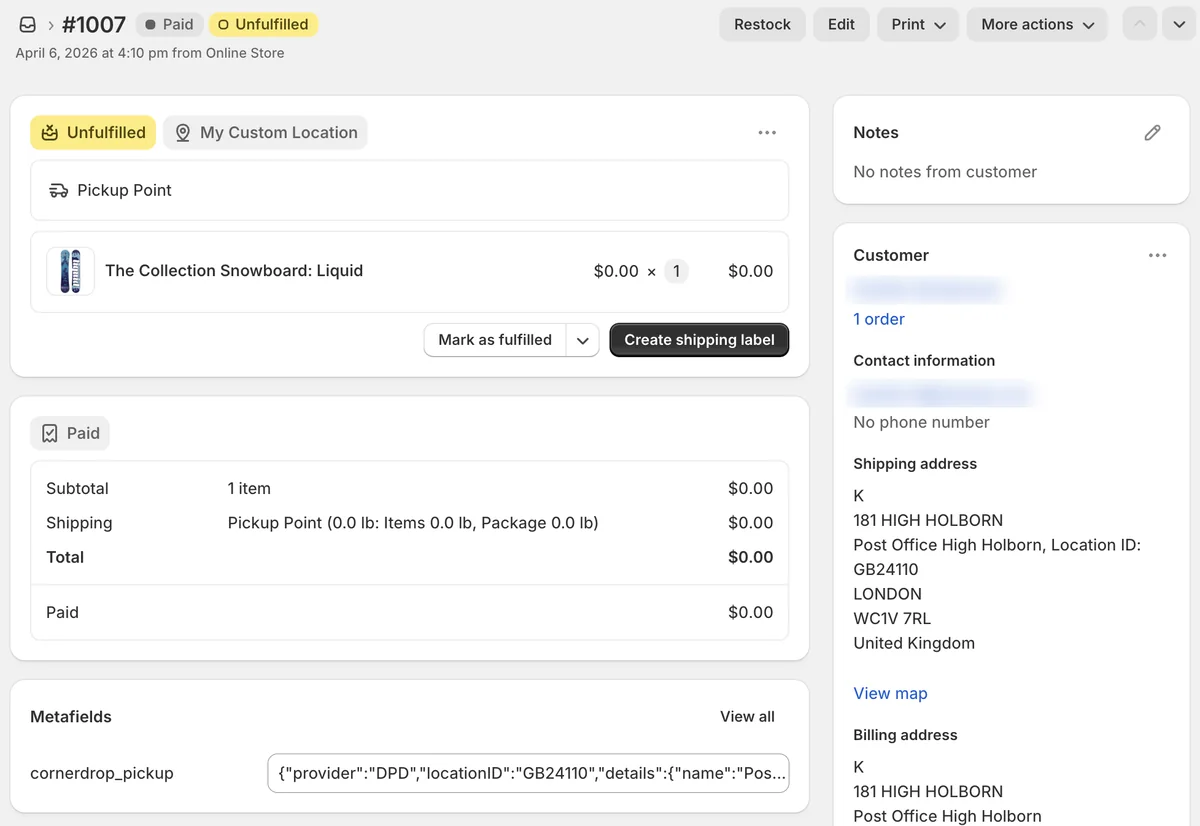
Your customers search by postcode, pick a point from a map or list, and the chosen location is saved to the Shopify order.
On Shopify Plus
The map appears inside checkout. The pickup point becomes the order's shipping address, ready for fulfilment.
On other Shopify plans
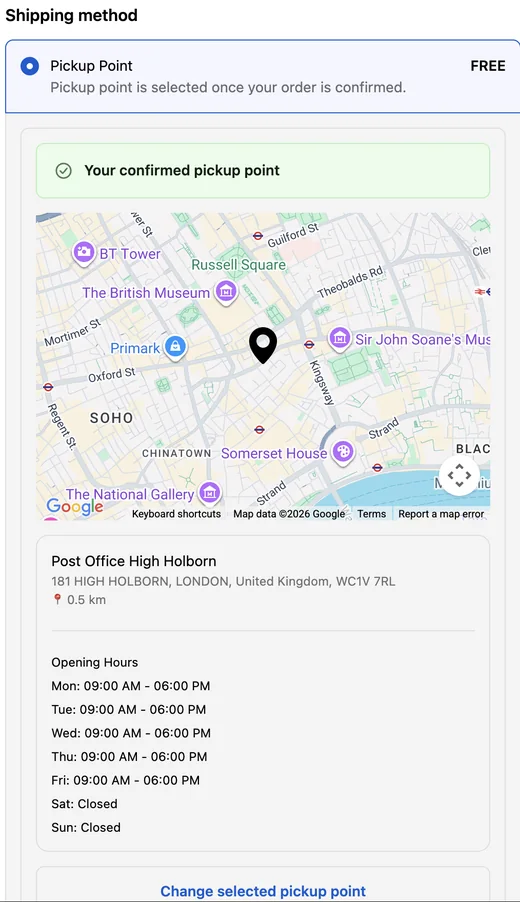
Customers pick their point on the order confirmation page, just after checkout. The choice is saved to the order, and you use it when you create the label.
Simple for your customers, clear for your team
Real screenshots from our Shopify demo store, with a test order to a pickup point in London.
Carriers your customers already know
Cornerdrop shows the pickup networks of the carriers you already use. These are the ones we've tested so far.
DPD
UKEurope
Evri
UKEurope
UPS
UKEurope
DHL
Europe
Mondial Relay
Europe
Setting up pickup delivery
To send a parcel to a pickup point, your carrier account needs its ship-to-pickup service switched on, and your labels need to use it. Labels aren't automatic. During your free setup we work through this with you and your carrier, then place test orders before you go live.
Using another carrier?
"Europe" means mainland Europe, where we've tested these networks in several countries. If you ship with someone else, tell us which carrier and we'll let you know honestly whether we can support it.
Launch offer for UK stores: six months free, and we'll set everything up with you
Install Cornerdrop from the Shopify App Store and we'll get pickup points working on your store with you, from connecting your carrier to your first test order. We'd love your feedback along the way.
What's included
- Installation and carrier connection, set up with you
- Pickup rate and checkout set up to match your store
- Help switching on your carrier's ship-to-pickup service
- Test orders together before you go live
- Six months free for UK stores, then a paid plan only if you want to stay
- A direct line to our team, and a say in what we build next
Plans and pricing
Billed by Shopify in US dollars, with a 30-day free trial. Both work with any Shopify plan. UK stores get six months free as a launch offer.
Standard
- Up to 500 pickup orders a month
- Distance-based sorting
- Support within 1–2 business days
Advanced
or $300 USD a year
- Unlimited pickup orders
- Priority same-day support
- Early access to new integrations
- Suited to busier stores and Shopify Plus checkouts
On the Shopify App Store, Standard is listed as the "Basic Plan" and Advanced as the "Plus Plan". Despite the name, the Plus Plan isn't limited to Shopify Plus stores.
Questions merchants ask
Which Shopify plans does it work on?
All of them. On Shopify Plus the map sits inside checkout. On other plans, customers choose their pickup point on the order confirmation page, just after checkout.
Do I need my own carrier account?
Yes. Cornerdrop shows your carrier's pickup network; it doesn't replace your carrier. Your account also needs the carrier's ship-to-pickup service. With some carriers that means agreeing a rate with your account manager, and we'll help you with this during setup.
How does the parcel get to the pickup point?
The pickup location is saved on the Shopify order. The shipping label then has to be created as a pickup delivery for that location. Labels aren't automatic. During your free setup we help you get this working with your carrier and test it before you go live.
What do my customers pay?
Whatever you choose. You set the price of your pickup-point shipping rate in Shopify, and you can make it free.
What's the launch offer?
UK stores get six months free, and we'll set everything up with you, free. After the six months, you can move to a paid plan or uninstall. We'd love your feedback along the way.
How long does setup take?
We do it with you on a call. Most of the work is connecting your carrier account, setting up pickup delivery with your carrier and placing test orders before you go live.
What happens to customer data?
See our privacy and data policy. If you have a specific question, email us.
Who's behind Cornerdrop?
Cornerdrop Technologies Inc. is a small team based in Toronto, Canada. Cornerdrop Pickup Points has been on the Shopify App Store since July 2025.
Want pickup points on your store?
Start your free trial on the Shopify App Store. If you'd like help, email info.cornerdrop@gmail.com with your store URL, the carrier you use and your Shopify plan, and we'll reply personally.